Which Mac Should You Buy in 2026?

Video: Which Mac Should You Buy in 2026?
Apple’s Education Store Makes Choosing Easier — But It Still Depends on Who You Are
Apple’s official Mac education store lists laptops and desktops spanning every use case and budget — from entry-level machines under $500 to professional rigs north of $6,000. But choosing the right Mac isn’t just about price. It’s about how you work, what you prioritize, and whether you want portability, power, or the best balance of both.
Here’s your ultimate guide to picking the right Mac in 2026 — whether you’re a student, creator, developer, or professional.
The Mac Lineup at a Glance
Apple’s education store currently offers the following Mac models:
- MacBook Air — starting around $899
- MacBook Pro (14” M5) — from about $1,499
iMac (24”) — around $1,249
Mac mini — from $499
Mac Studio — from $1,799
Mac Pro — starting at $6,599
Plus professional displays and accessories.
This lineup spans the full computing spectrum: from lightweight everyday machines to desktop powerhouses built for creative and technical workloads.
- MacBook Air — The Most Versatile Everyday Laptop
- Best For
Students
Remote workers
Casual creatives
Everyday multitaskers
Why It’s Worth Considering
The MacBook Air consistently delivers a strong balance of portability and performance, especially with Apple’s newest chips. Its light weight makes it ideal for students who carry their laptop across campus. M-series chips — including the newer M4 / M5 — offer impressive battery life and snappy performance for typical workflows.
Users often report that the Air handles productivity, browsing, document editing, and media work without hiccups. It’s also one of the best value choices if you want a laptop that “just works” without paying for high-end performance you don’t need. Community sentiment generally praises this model for those reasons.
Weakness
Not ideal for sustained heavy compute tasks like advanced 3D rendering or high-end video production.
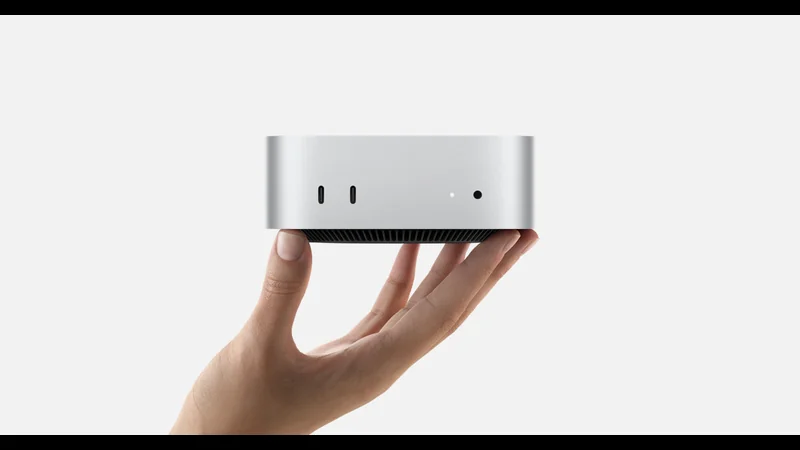
- MacBook Pro 14” — For Power Users and Creatives
- Best For
Video editors
Software developers
Power users
Creative professionals
Why It Stands Out
The MacBook Pro 14” with the M5 chip sits in a premium segment offering significantly more performance headroom than the Air. This model often includes extra GPU cores, improved cooling, and more ports — helpful for developers and pros who work with large files or complex applications.
Prospective buyers on forums mention that Pro models feel noticeably more stable under heavy workloads compared to Air models, especially for continuous tasks like compiling code or processing large media projects.
Considerations
Higher price
Slightly heavier and thicker than Air
iMac — Desktop Simplicity With Screen Built In
Best For
Home offices
Content creators
Educators
People who prefer a desktop experience
Why It’s Distinct
The iMac offers a 24-inch Retina display, built-in speakers, and webcam — all in one elegant package. It’s a compelling choice if you don’t need portability but want a powerful, space-efficient setup.
Some buyers note that, when compared with similarly equipped laptops, the iMac delivers the same core performance with the benefit of a larger display.
But
You will need external peripherals (keyboard, mouse) if not included in your education store promo. And desktops naturally lack mobility.
- Mac mini — Compact Power and Flexibility
- Best For
Developers on a budget
Home media/entertainment systems
Secondary workstation
Why It’s a Smart Pick
At around $499, Mac mini delivers impressive performance for the price, especially with Apple Silicon chips, and can be paired with any monitor you already own. It’s one of the best value-for-performance machines in the Apple ecosystem.
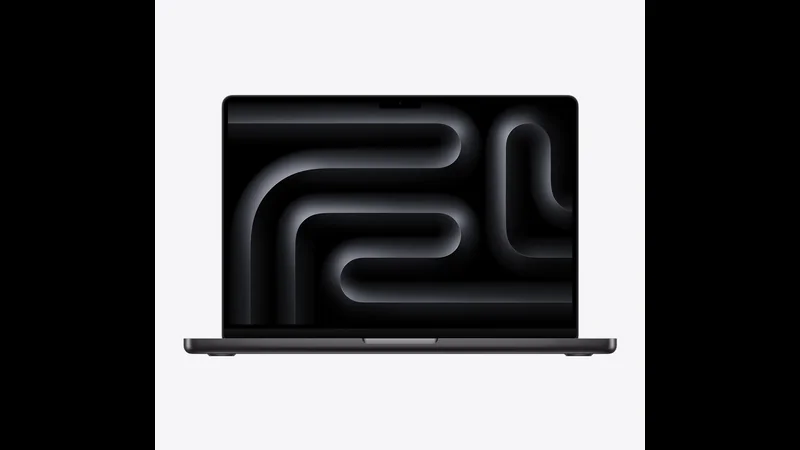
Tech reviewers and community users alike praise the Mac mini for its flexibility — especially in setups where users already have displays or peripherals.
Limitations
If you don’t already have a monitor or keyboard, the total cost rises.
- Mac Studio — Serious Creative and Technical Power
- Best For
High-end video production
3D rendering
Music production
Large data workflows
Why It Matters
The Mac Studio sits between the Mac mini and Mac Pro in both price and performance. It’s designed for professionals who need more horsepower than consumer laptops but don’t require a full-blown Mac Pro tower.
For many independent creators and small studios, the Studio platform may hit the sweet spot of performance and cost.
- Mac Pro — The Tower for Uncompromising Workflows
- Best For
Film studios
Scientific research
Enterprise-level compute
Massive video and graphics pipelines
This is Apple’s flagship desktop offering, with extreme configuration potential. It’s expensive, yes, but it’s built to handle workloads that no other Mac in the lineup can manage comfortably.
For most buyers — even professionals — alternatives like Mac Studio or high-end MacBook Pro often hit the sweet spot. Only very specific users truly need a Mac Pro.
- How to Choose Based on Your Needs
- Students and Education
- If you need mobility
- long battery life
- value
- MacBook Air is the default recommendation. It handles productivity
- browsing
- research
- creative tasks with grace.
Creativity and Professional Media Work
Choose MacBook Pro (14”) or Mac Studio depending on your mobility needs and budget. Pro laptops are portable but powerful; Studio desktops focus on raw performance.
Home Office or Everyday Desktop
The iMac is a balanced all-in-one — great for education, office productivity, and content consumption. The Mac mini is the budget-friendly alternative if you already have a monitor.
Ultimate Power Users
If your workflows demand the highest possible performance and expandability, the Mac Pro is the only machine that truly fits — albeit at a premium.
Conclusion: There’s No One-Size-Fits-All Mac — But There Is One For You
Whether you’re a student on a budget, a creative professional making media, or a power user pushing compute limits, Apple’s education store gives you options tailored to your use case. The key isn’t just the price — it’s matching hardware to how you live and work.
In 2026, the Mac you should buy depends less on a single headline spec and more on what you want your computer to do for you.
Latest Articles
Stay updated with the newest tech stories
Trending Now
Most popular articles right now
Most Read
Most viewed articles this week
Editor's Picks
Premium articles selected by our editorial team